Bloxie
MenuClose

07806 615231stuart@bloxie.co.uk

AI tools.

Less admin.Faster replies.

Two simple tools that work from your website’s quote form and your own email. One answers every new enquiry straight away. The other turns your notes into a tidy quote, for you to check and send.

What your customer getsStraight away
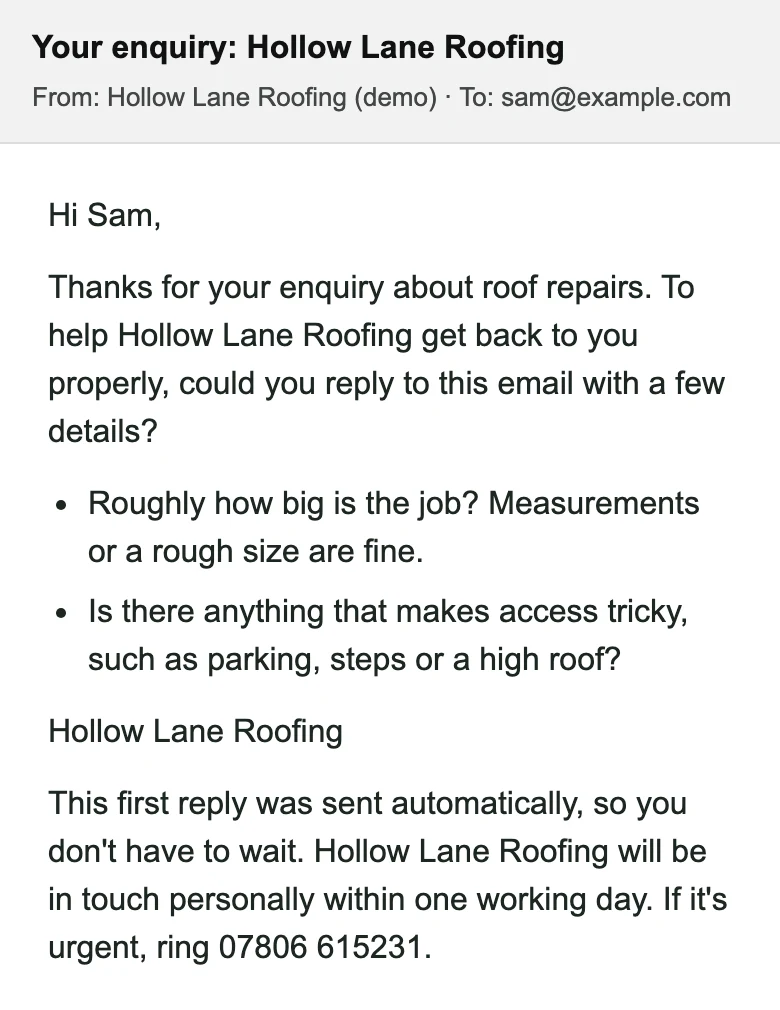
The first reply a made-up customer, Sam, gets from the demo roofer: it asks roughly how big the job is and whether anything makes access tricky, and says it was sent automatically.

Try it.

Send the demo an enquiry.

See the reply for yourself. The demo is a made-up roofer, so ask about any roofing job you like.

01

Open the quote form.

A full website for a made-up roofing firm, clearly labelled as not a real business.

02

Tell it about a job.

A leak, some slipped tiles, anything. Give your real email address, because that’s where the reply goes.

03

Check your inbox.

The reply is sent as soon as you press send, asking what a roofer would need to know. It’s the same kind of reply your own customers would get.

Open the demo’s quote form

Opens in a new tab. Your enquiry comes to me as well, the way it would come to the owner. Nobody will turn up to look at your roof.

The tools.

What each one does.

Everything works from your email. There’s no new app to learn, and you get a short guide with pictures from your own website.

Tool 1 · Ready now

Enquiry assistant.

Every new enquiry gets a reply straight away.

  • Someone fills in your quote form and gives their email address.
  • Straight away, they get a friendly reply asking how big the job is, for photos if they didn’t send any, and whether anything makes access tricky.
  • It says it was sent automatically, that you’ll be in touch within your usual time, and gives your number for anything urgent.
  • It never gives a price or a date. If the AI can’t be used, a fixed reply with the same questions goes instead.

Why it helps: the customer knows you’ve got their enquiry, and you get the details you’d otherwise ring back for.
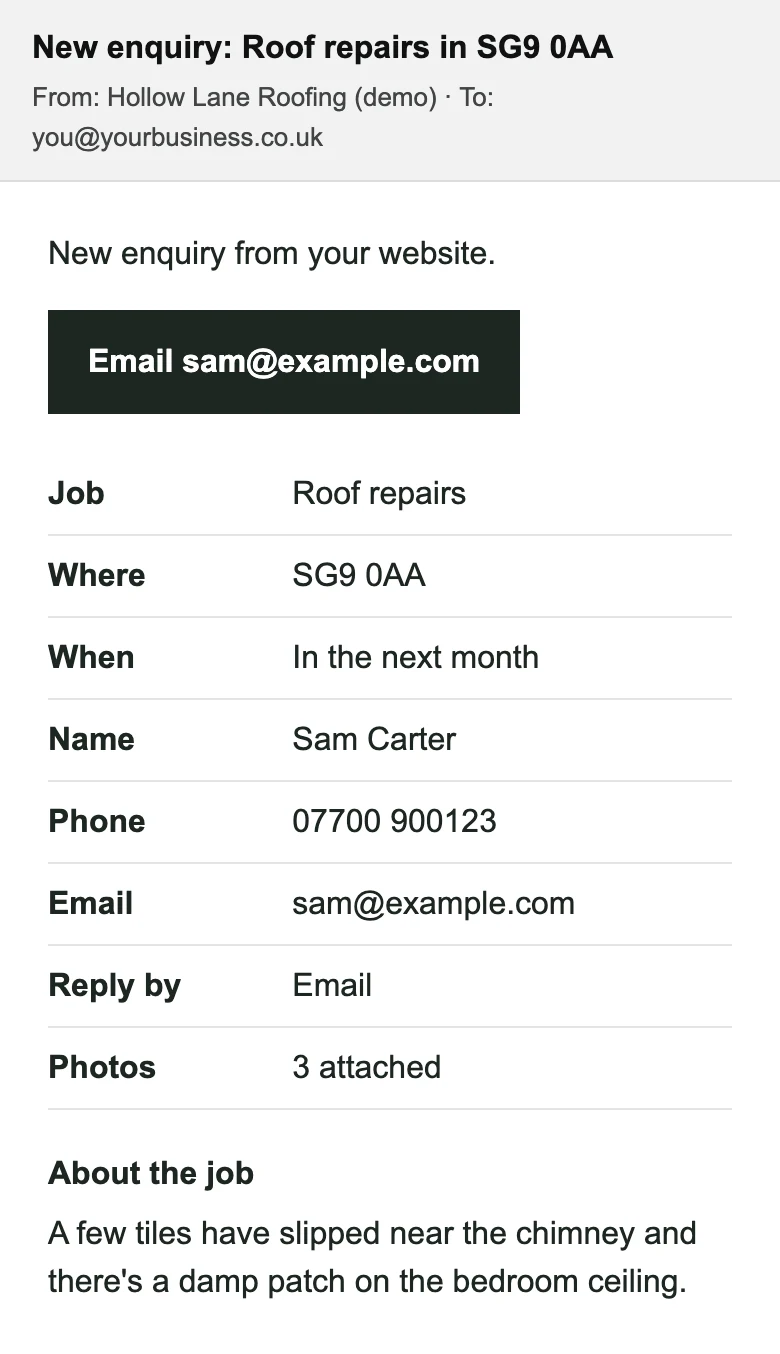
The enquiry email the owner gets: job, postcode, when, name, phone, email, how to reply, photos, and what the customer wrote.
The enquiry you get.
The first reply the customer gets straight away, asking about the size of the job and access.
The reply your customer gets, straight away.
Coming soon

By text too. The same first reply by text, for customers who’d rather have one, and a text back when you miss a call. Part of the enquiry assistant, at no extra cost.

Tool 2 · Ready now

Quote drafts.

Your notes in. A tidy quote out.

  • Press “Draft a quote” in the enquiry email. For a job that came by phone, start one from your own private page.
  • Type what you’ll do in your own words, and pick the prices from your usual items.
  • A draft quote arrives in your email, written up neatly with your prices and payment terms.
  • Press “Send”. It opens in your own email, from your own address, so you can change anything before it goes.

Nothing is sent for you. The quote only goes when you press send in your own email.

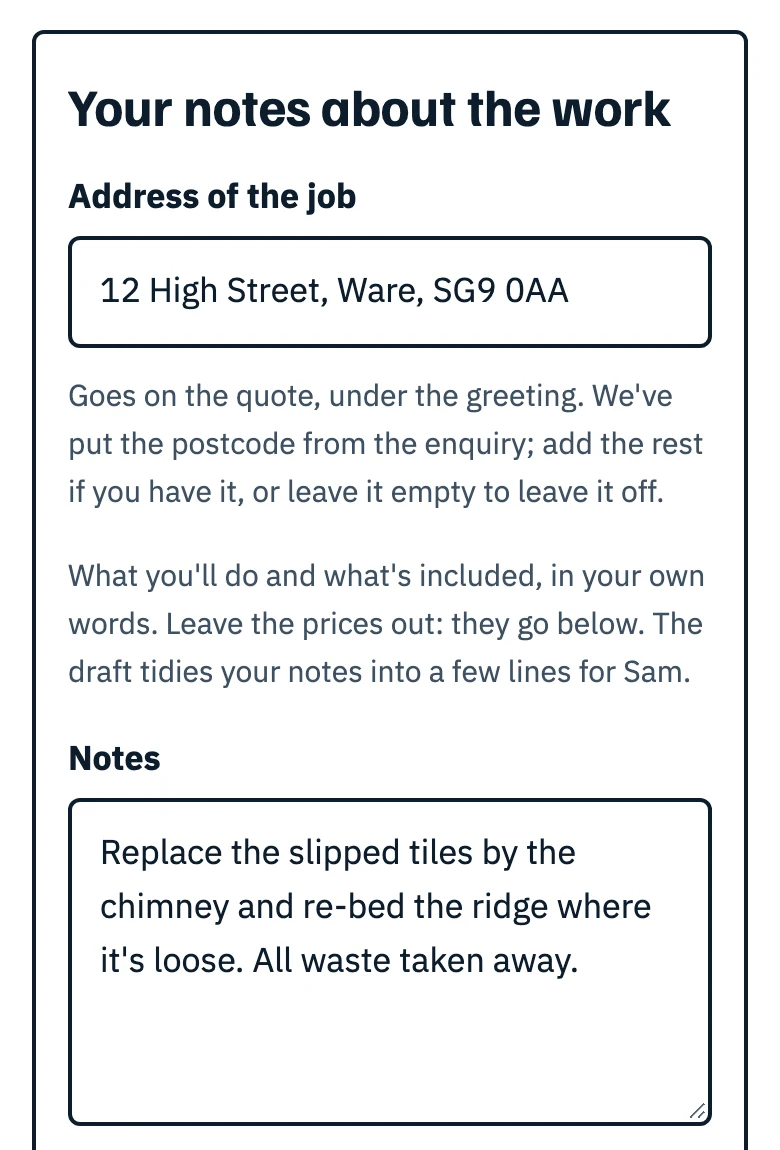
The Draft a quote page: the address of the job, and the owner’s notes about the work in their own words.
Your notes about the work.
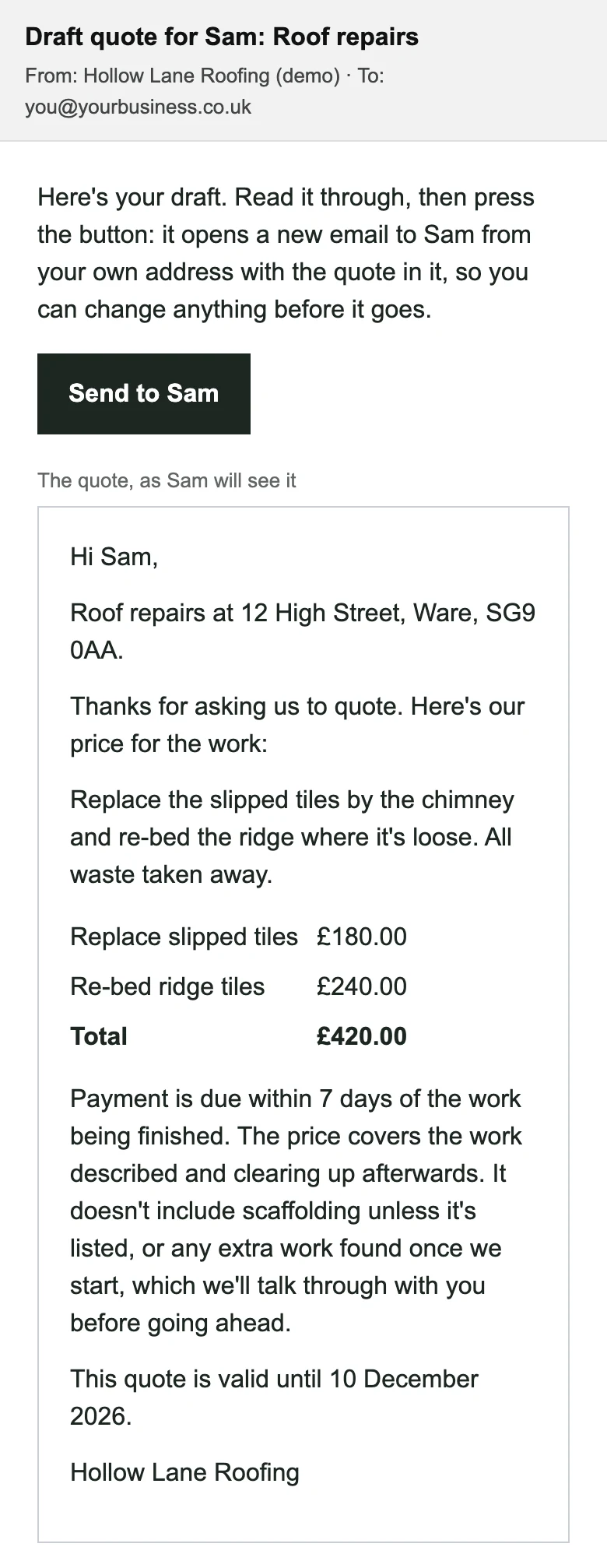
The draft quote email: a Send to Sam button, then the quote as Sam will see it, with the work, two priced items, the total, payment terms and how long it’s valid.
The draft quote you get back.
Tool 3 · Coming soon

Google review replies.

A reply ready for every review.

A thank-you for every good review and a calm, professional reply for a bad one, drafted for you to approve. Coming soon, at no extra cost.

No picture until it’s built

You’re in charge.

Drafts, not decisions.

The tools write. You decide. Here’s exactly what they do with your customers’ details.

Check before you send.

Drafts can have mistakes in them, so read every one before it goes to a customer. Quotes and review replies always wait for you.

The only thing that goes on its own is the first reply to a new enquiry. It only asks for details and photos, never prices or dates.

Your customers’ details.

To write a draft, the tools send the enquiry’s details to Anthropic, the company behind the AI. Texts will go through Twilio, and WhatsApp messages through Meta.

Your site’s privacy notice explains this to your customers. Everything the tools write for you, and all your customers’ details, are yours.

A cap on the costs.

Your tools run on their own AI account with a monthly spending limit, and a daily limit on replies, so a flood of spam can’t run up a bill.

Up to £10 a month of AI running costs is included.

Price.

All three tools, one price.

£39a month+ £250 one-off setup

That’s for all three together, not per tool.

  • Enquiry assistant and quote drafts: ready now
  • Texts and review replies: coming soon, at no extra cost
  • AI running costs up to £10 a month included, then at cost
  • Texts and WhatsApp up to £5 a month included, then at cost
  • Setup paid before I set the tools up, or with the deposit for a new website
  • Cancel with 30 days’ notice

They’re built into the websites I make. No VAT to add.

Bespoke AI tools.Something specific to how you run your business? We talk it through first, then I quote for the job.Let’s talk

Questions.

About the AI tools.

Does anything go to my customers without me?

Only the first reply to a new enquiry. It asks for details and photos, says it was sent automatically, and never gives a price or a date. Quotes always wait for you to press send.

What if the AI gets something wrong?

That’s why quotes are drafts: you read them and change anything before they go. The first reply is checked automatically to make sure it only asks questions. If it doesn’t pass, or the AI can’t be used, a fixed reply with the same questions goes instead.

Do I need to learn a new app?

No. It all works from your email: the enquiry email has a “Draft a quote” button, and the draft comes back to your inbox. You also get a short guide with pictures from your own website.

Can I add them later?

Yes, any time. The £250 setup is paid before I set them up.

Do they work on any website?

They’re built into the websites I make, so they need a Bloxie site. If you’re not sure your current site is worth keeping, start with a free site check.

Start owning your leads.

Book a 15-minute callGet a free site check

07806 615231stuart@bloxie.co.uk